When you shoot RAW + JPEG, one shutter press creates two files. In Louppe, you can review a matching pair as one photo, apply a decision to both files, and copy the pair together. Turn pairing off when you want to judge the RAW and JPEG separately
Louppe is a free, open-source media culler for Apple silicon Macs running macOS 14 or later. Your review stays on your Mac and works offline
What counts as a RAW + JPEG pair?
A camera might produce DSCF0123.RAF and DSCF0123.JPG: a RAW file and a JPEG with the same filename stem. These are two versions of one shot, rather than two copies of the same file
Louppe groups unambiguous matching RAW + JPEG files. It doesn't pair photographs by how similar they look. When more than one RAW or JPEG could match, the files stay separate
Start with a folder copied from your camera card, with a backup kept separately. Keeping the camera filenames makes the relationship easier to follow
Review each shot once
- Open the folder in Louppe
- Open Filter and enable Treat matching RAW + JPEG as one photo when matching pairs are available
- Review in Gallery, or press G for Grid
- Press F for Yes or D for No as you move through the shoot
With pairing enabled, a rating or item action applies to both files. That includes Yes/No decisions, stars, and colour labels. Marking No doesn't trash either file
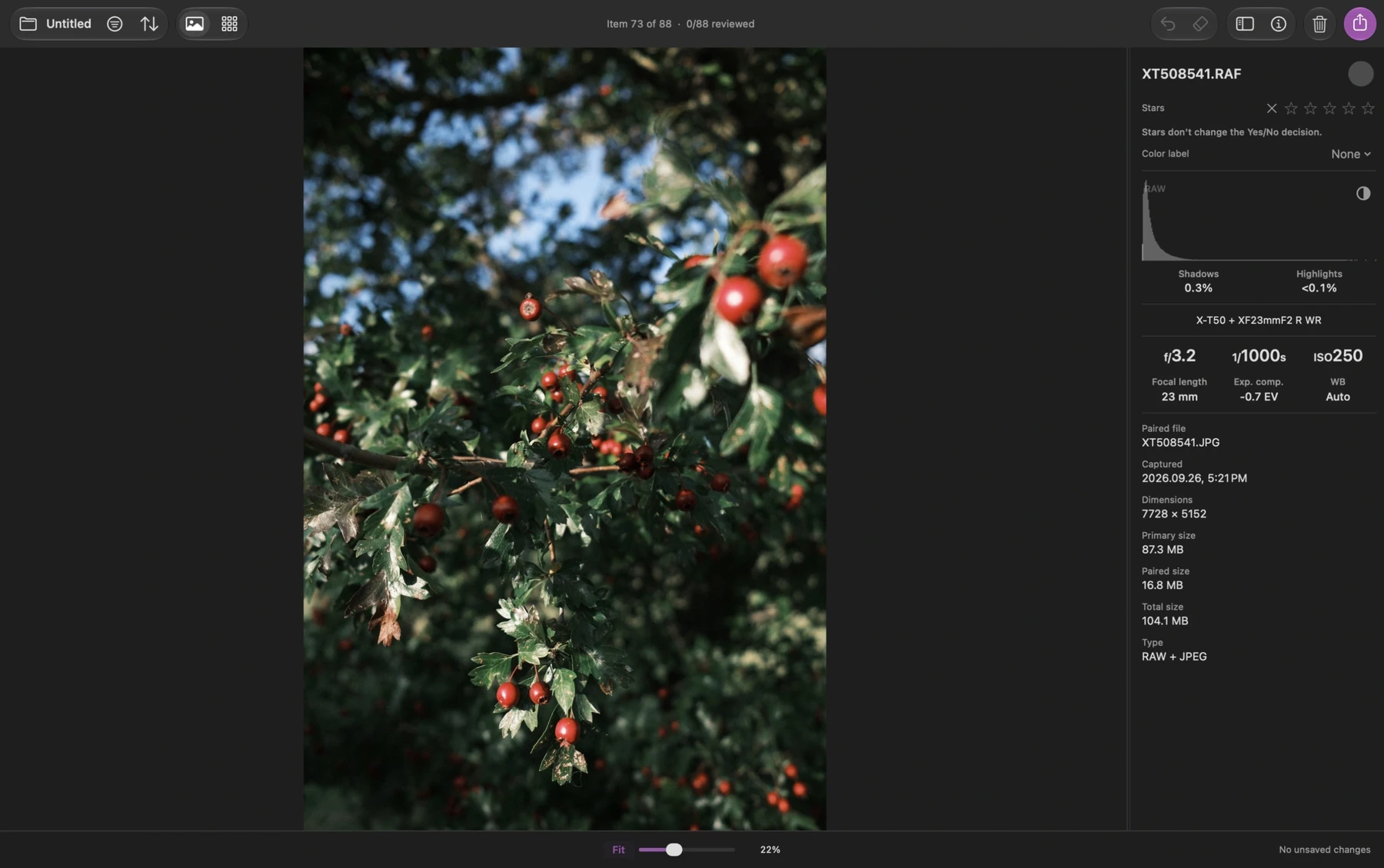
Grouping changes how you review the pair. The RAW and JPEG remain separate files on disk, and Louppe retains their individual ratings
Decide whether you want both versions
Sometimes the camera JPEG is ready to share, while the RAW is worth keeping for a later edit. Sometimes only one version belongs in your selection
For those cases, turn Treat matching RAW + JPEG as one photo off. Review the files separately and give each the decision you want. For example, mark the JPEG Yes for an immediate selection and leave the RAW undecided for a later pass
Turning pairing back on doesn't erase those separate decisions. If the two files disagree, the pair can show a Mixed decision. Review it before exporting rather than assuming both files have the same mark
If you want to keep independent decisions, continue in separate mode. Applying a new decision to a grouped pair applies it to both files again
Check focus and the preview source
A RAW file and its camera JPEG can look different. The JPEG contains the camera's rendering; a RAW decoder makes its own rendering
In Louppe's Fast display, RAW photos use previews below 100% and Apple RAW rendering at 100% and above. Press S to inspect at centred 100%; press it again for Fit. The Preview and RAW labels identify the display source
For a decision about the camera JPEG's colour or look, switch to separate mode and open the JPEG itself. Leave the final RAW edit for your editor, whose rendering may differ from Louppe's
Copy the files you actually want
Open Export with E or ⌘E, choose Copy, and check the scope, decisions, and matching count
When you include a grouped pair, both files are copied. One photo in the review can therefore mean two files at the destination
For a selection containing only one version, use separate mode and select or filter the files you want first. Check Export again: an active selection starts with All selected, while no selection starts with filtered Keepers (Yes)
Try the workflow with a few pairs first, then open the destination in Finder and check that the filenames and formats match your intention. Keep the source folder and backup until you've verified the result
Pairing isn't duplicate removal
A RAW and JPEG with a shared name aren't interchangeable duplicates. Keep both if you need the camera's finished image and the flexibility of a RAW edit
You don't need Clean Up to finish a cull. Leave unwanted files marked No if you're still deciding what to archive. Clean Up is a separate action that sends files to macOS Trash; review its scope before confirming it
For the next step, copy your keepers into a folder for editing. The guide covers Lightroom Classic, Capture One (C1), and darktable.
Watch Louppe's short walkthrough, or tell me how you work with RAW + JPEG